|





 |
|
|||||
 |
||||||
|
||||||



|
|
|
A Brief Guide in using Kawa
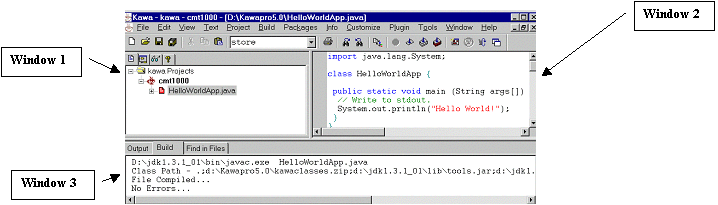
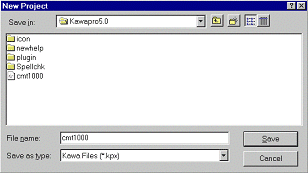
To start KawaAt the windows menu select: Start=> Middesex local software => Programming language =>Kawa 4.01 The Kawa interface is made up of 3 windows (see Fig A) Window 1 All the projects and program you create are listed in this window Window 2 Is the coding environment where you code your Java programs Window 3 Displays information in respect to your compiling and running status. Any error messages will be displayed in this window Fig A In KAWA a Project is a logical collection of files. Think of a project as simply a folder where you store your lab programs in.To create a new project Under the “Project” menu, select “New“ and enter the desired name (i.e. CMT1000.) of the Project in the New project dialog box (Fig B). Fig B
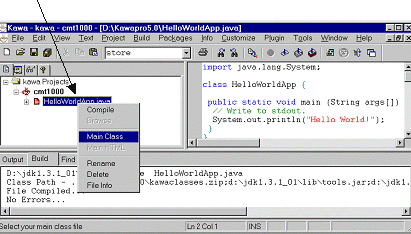
The newly created project will then be added to the Project tab. (see Fig A Window1) Now we have created a project, we need to create a file where we can put our code in, this file is essentially the program. Under the “File” menu, select “New”. A window will open. (See Fig A window 2) This is where you code your program. To save the file: Under the “File” menu, select “Save as” and enter the desired name you wish to save the file as. Once you have saved the file a message box will appear, “select yes to add this file to the project otherwise select no” You select yes. The file is then added to your project (See Fig A window 1) To compile the program: Under “Build” menu, select “Compile” if there are no errors, a message will be displayed in window 3 saying “file compiled… no errors”, You are now ready to run your program. To run the program: Under “Build” menu, select “Run” The output of your program will be shown in window 3 Please note that that a project may contain more than one program, therefore you must tell Kawa which program you which to compile/Run. You do this by “right clicking” on the program you wish to compile/run and choosing “Main Class” from the menu see Fig C. Fig C
There are other features in Kawa too numerous to be listed in this short guide. These features will aid you in your coding and productivity, so be adventurous and experiment!! |
|
|
| [Home] [Labs] [Seminars] [Guides] [Xtras] |